Essential Wedding Coordination Tools for Vendors and Guests in 2026
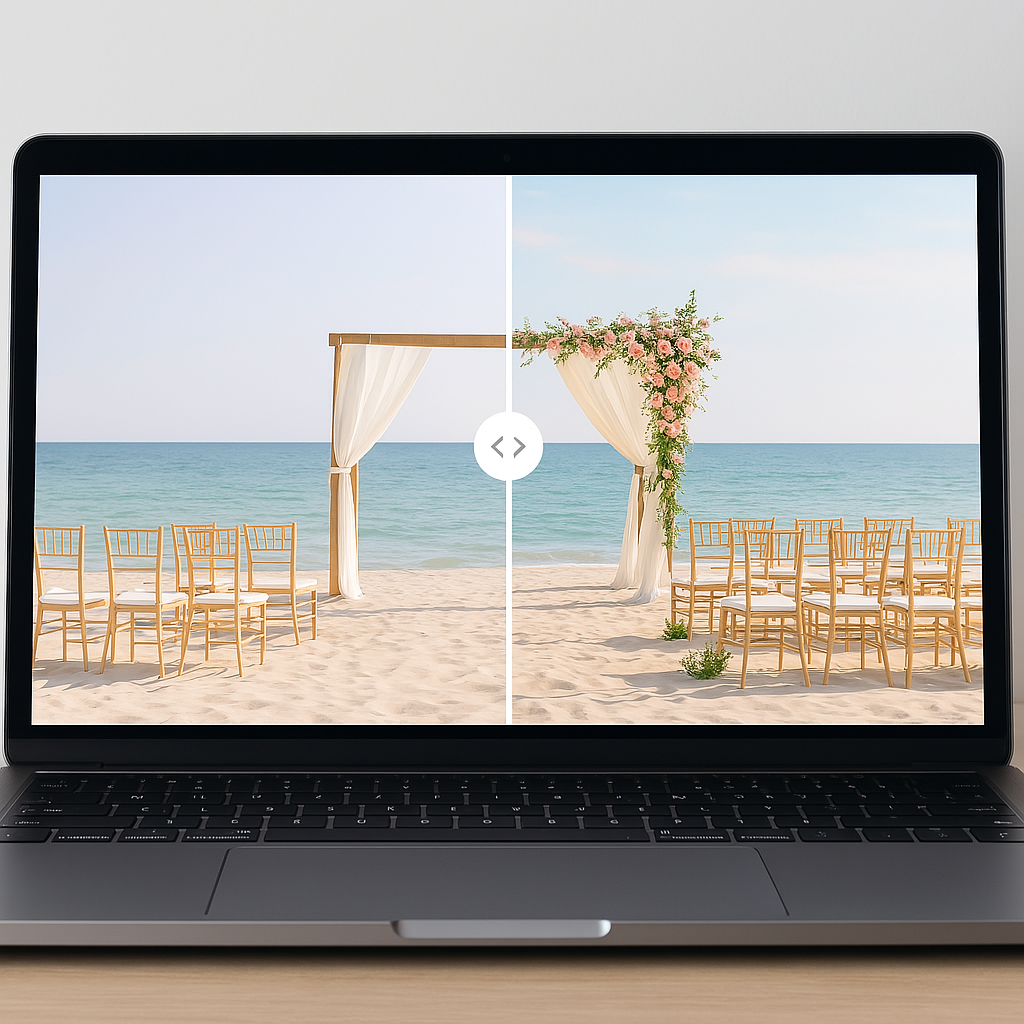
Coordinating a wedding in 2026 operates much like running a complex product launch. You are managing multiple specialized vendors, hundreds of independent users (your guests), strict delivery timelines, and highly constrained budgets. In this environment, there is zero margin for communication failure. The fundamental difference between a seamless event and a chaotic one comes down to your operational infrastructure. The tools you choose do not just assist you. They dictate your actual workflow.
We have firmly transitioned from analog checklists to sophisticated digital ecosystems. However, as couples adopt more specialized software, a massive friction point has emerged. Most platforms effectively answer the logistical questions of "what needs to happen" and "when it needs to happen." Very few solve for visual clarity. They fail to communicate exactly how an empty space will transform into a finished environment.
This visualization gap is the primary driver of budget overruns and vendor misalignment. Before you sign another contract or authorize a massive rental invoice, you must solve this operational blind spot. By choosing to discover exactly how your venue will look fully decorated, you lock in your visual blueprint early. This guide deconstructs the definitive coordination stack for vendors and guests this year and details precisely where accurate visualization fits into a high-leverage planning system.
1. The Coordination Backbone: All-in-One Wedding Platforms
Every efficient system requires a central source of truth. For modern couples, this backbone is the all-in-one planning platform. Solutions like Zola, The Knot, Joy, and WedSites have become the operating systems for the entire engagement period. They consolidate fragmented tasks into a unified interface.
These platforms execute the critical foundational work. They provide centralized task checklists tied directly to your specific wedding date. They handle guest list management alongside digital RSVP tracking. They integrate universal registries and offer rudimentary budget tracking capabilities. By centralizing these tasks, they reduce the cognitive load of jumping between disconnected spreadsheets and notepads.
For vendors and guests, this centralization is highly functional. Vendors gain a reliable reference point for dates, times, and core logistical details. Guests avoid chasing scattered emails because they can access event details and travel information through one unified portal.
However, a fundamental limitation exists within these platforms. All-in-one systems answer structural questions but fail at aesthetic communication. You use your main planning platform to manage logistics. You then supplement it by attaching VenuePreview images to your vendor portals or shared folders. By embedding these photorealistic visualizations into your wedding website's "Our Vision" section, you immediately align your guests and vendors with your specific aesthetic goals.
2. Vendor-Side Essentials: CRMs, Timelines & Floor Plans
a. Vendor CRMs (Photographers, Planners, DJs, Venues)
Professional wedding vendors operate high-velocity service businesses. Consequently, they rely on specialized Customer Relationship Management systems. Platforms like HoneyBook, Dubsado, Abastio, and Wedy Pro serve as the transactional engines for the industry.
These systems manage the critical workflows of running an event business. They handle inbound inquiries, execute contract signatures, process invoices, and trigger automated email sequences. This infrastructure keeps payments and communications strictly organized. More importantly, it eliminates the operational risk of a vendor missing a critical email or overlooking a contractual detail.
Your vendor's CRM acts as the primary data repository. To maximize its effectiveness, you must inject visual clarity into that data. By uploading your visualization files into your vendor's CRM project notes, you completely reduce vendor communication friction. You move the conversation away from subjective descriptions like "romantic and moody" to objective directives like "this is the exact layout and lighting scheme we require."
b. Timeline Builders & Day-Of Coordination Tools
The execution phase of a wedding requires minute-by-minute synchronization. For planners and highly organized couples, dedicated timeline software like Timeline Genius is non-negotiable.
These tools generate a master day-of schedule encompassing vendor load-in, photography sessions, ceremony cues, and reception flow. Their absolute highest value lies in generating vendor-specific views. The DJ receives exact music cues. The photographer sees dedicated portrait blocks. The catering staff receives precise meal service windows.
Venue visualization does not replace these timelines. Instead, it informs them with data. Once you see your actual venue fully decorated, you can accurately estimate your setup start times based on the visual complexity of the decor. You can define exact lighting transitions because you have already modeled them. A realistic preview turns a vague spreadsheet note into a highly specific operational directive.
c. Floor Plan & Seating Tools
Spatial logistics represent a massive variable in event planning. Platforms like Social Tables and AllSeated have become the industry standard for mapping these constraints.
These applications provide drag-and-drop interfaces for table placement, capacity tracking, and guest assignments. Caterers rely on them for dietary flags and service routes. Venue managers require them to confirm fire code compliance. Floor planning tools guarantee that your event functions safely and efficiently.
Yet, a floor plan only shows where physical objects reside. It cannot show you how the room will feel. You must use spatial visualization to decide between round or banquet tables based on aesthetics, not just math. You can compare high versus low centerpieces in your specific space to ensure they do not obstruct sightlines. After generating dozens of options, you lock in the winning design and build your logistical seating chart around that validated layout.
3. Guest-Facing Tools: Communication, Travel, and Experience
a. Wedding Websites & Guest Portals
Guest experience is a direct product of clear communication. Your guests require immediate access to ceremony times, dress code specifics, transportation logistics, and add-on event details. While all-in-one platforms host this information, your presentation format dictates guest compliance.
This is a prime acquisition channel for guest excitement. You should create a dedicated section labeled "Our Reception Vision" featuring a curated selection of your rendered space. For destination weddings specifically, showing how a raw space will transform helps guests understand the value of their travel investment. When you pair a "black tie optional" dress code with an image of a heavily stylized, candlelit ballroom, guests implicitly understand the assignment. They are far more likely to respect your aesthetic requests when they can literally see the final environment.
b. Messaging & Day-Of Communication (WhatsApp, SMS, Email)
Synchronous communication is critical during the final week of planning. In 2026, vendor teams and wedding parties rely heavily on localized group chats via WhatsApp or iMessage.
Email handles the formal contracts, but SMS groups handle the tactical pivots. These channels manage sudden weather contingencies, shuttle delays, and emergency contact routing. To optimize these channels, you must anchor them with visuals. Dropping a specific rendered image into a wedding party chat instantly resolves location confusion. When you can point to a specific visual marker for the photo booth or the welcome signage, you eliminate the barrage of frantic day-of text messages.
4. Design & Inspiration Tools vs. Real-Space Visualization
a. Traditional Inspiration Tools (Pinterest, Instagram, Canva, mood boards)
The top of your planning funnel typically involves broad visual research. Platforms like Pinterest, Instagram, and Canva serve as excellent aggregation tools for high-level inspiration. You collect color palettes, floral concepts, and typography ideas to build initial mood boards.
However, modern couples run into a severe contextual problem. Collecting generic inspiration images introduces massive friction downstream. A towering floral arch photographed at sunset in a California vineyard does not translate gracefully to a windowless hotel ballroom in Chicago. When couples rely strictly on mood boards, they are presenting out-of-context data to their vendors. This misalignment is the root cause of the infamous "Pinterest versus reality" disappointment.
b. Where VenuePreview is essential (and different)
To bridge the gap between abstract inspiration and concrete execution, you need a deterministic solution. VenuePreview sits precisely in the middle of this workflow.
The system operates on strict inputs and outputs. You upload a maximum of three photos of your actual empty venue. You select your curated style templates and color schemes. Within ten to twenty-five minutes, the AI engine processes these inputs and returns forty to two hundred photorealistic visualizations. These renders show your specific space fully decorated.
This process allows you to run rapid A/B tests on your aesthetics. You can compare a modern minimal layout against a classic black-tie setup in the same room. Instead of handing a vendor fifteen disjointed Pinterest images and hoping they understand your intent, you hand them a deterministic output. You establish total visual clarity, resulting in fewer costly design revisions and absolute confidence in your vendor selections.
5. Budget & Logistics Tools (and How Visuals Prevent Overspend)
Spreadsheets remain the undisputed champions of granular budget tracking. Advanced Google Sheets and custom Notion templates are universally utilized to manage line-item expenses, track vendor payment schedules, and calculate service fees.
The primary threat to any event budget is decorative scope creep. Data from 2026 reveals that eighty-five percent of couples report economic conditions impacting their wedding planning. Because economic pressure is high, optimizing your spend is mandatory. Couples routinely regret overspending on premium linens or redundant floral installations simply because they could not visualize the baseline options. They order extra decor as an insurance policy against an underwhelming room.
Visualization acts as a financial defense mechanism. By rendering the room before you authorize the invoice, you can instantly see the delta between standard and premium rentals. You can test whether additional ceiling draping actually elevates the space or simply clutters it. This data allows you to confidently downgrade "must-have" items to "nice-to-have" status within your spreadsheet, permanently protecting your budget from unnecessary bloat.
6. Practical 2026 "Tech Stack" for Vendors & Guests
A high-performance wedding operates on a tightly integrated tech stack. Adding more applications does not increase efficiency unless those tools serve distinct, non-overlapping functions. Here is the optimized architecture for this year.
For Couples
- Core Operating System: Zola, The Knot, Joy, or WedSites.
- Financial Ledger: Google Sheets or customized Notion databases.
- Visual Truth Layer: VenuePreview.
- Guest Communications: Platform website coupled with WhatsApp or SMS broadcasts.
- Spatial Logistics: Integrated platform seating tools or Social Tables.
For Planners & Vendors
- Client Management (CRM): Abastio, HoneyBook, Wedy Pro, or Dubsado.
- Execution Engine: Timeline Genius or specialized Google Sheets.
- Spatial Mapping: Social Tables or AllSeated.
- Proposal Generation: Canva embedded with photorealistic venue renders to accelerate client sign-off.
This stack minimizes redundancy. You export your generated images, inject them into your communication channels, and allow the visual data to streamline the entire approval process.
7. When to Use VenuePreview in Your Planning Timeline
Timing dictates leverage. Deploying a tool at the wrong stage of the lifecycle destroys its value. To maximize efficiency for both your budget and your vendor team, you must trigger the visualization phase at a highly specific moment.
First, you must secure your venue so you have accurate, empty source photos. Second, you must generate your visuals immediately before you lock in your decor-heavy vendors. This includes your florist, lighting technician, and rental company. Finally, you execute this process before you finalize your floor plans and day-of timelines.
By inserting the visual rendering phase right after venue acquisition, you anchor all subsequent decisions to a validated aesthetic blueprint. You then distribute these files into your vendor CRMs and guest-facing websites with absolute confidence.
8. Choosing the Right VenuePreview Package
Your operational requirements dictate your software tier. VenuePreview utilizes a direct, one-time purchase model structured to match the complexity of your event. Every tier processes a single venue upload and utilizes our fast ten to twenty-five minute generation engine to produce photorealistic results.
You should select the visualization package that fits your needs based on your decision-making style. The Basic package is designed for couples who possess a highly defined aesthetic and simply need rapid visual confirmation. For nineteen dollars, the system delivers forty unique visualizations across two distinct style variations, complete with email support.
If you need to iterate on multiple concepts, the Premium tier is the optimal choice. At twenty-nine dollars, it increases your output to one hundred visualizations spanning five style variations. It also unlocks priority support and crucial vendor sharing tools to accelerate your communication loops.
For professional planners or couples orchestrating complex, design-heavy events, the Luxury tier provides maximum leverage. For forty-nine dollars, you secure two hundred visualizations, ten style variations, priority support, vendor sharing capabilities, and access to custom styling options.
Building Your Modern Wedding Toolkit for Total Clarity
The most sophisticated coordination systems do not rely on sheer volume of software. They rely on strategic integration. They depend on a single source of truth for logistics, a rigid ledger for financial tracking, and an uncompromising visual layer that dictates the aesthetic execution.
When your team can operate from an accurate visual blueprint, every other tool in your stack multiplies in effectiveness. Timelines tighten because setup requirements are known. Budgets stabilize because speculative purchasing is eliminated. Recent industry data indicates that thirty-six percent of engaged couples have adopted AI tools for planning in 2026. The market is rapidly realizing that hoping a venue looks good is a failing strategy.
You have secured your venue. You have established your budget. Do not let design anxiety bottleneck the rest of your vendor workflow. It is time to eliminate the guesswork and move forward with absolute certainty.
Start visualizing your venue today and give your team the visual clarity required to execute a flawless 2026 wedding.
Related Posts
Ready to Visualize Your Wedding Venue?
See exactly how your venue will look on your wedding day with AI-powered visualizations. Get started in minutes with packages starting at just $19.