The Definitive Stack: Top Wedding Planning Spreadsheets and Digital Tools for 2026
The architecture of wedding planning has fundamentally shifted. We are no longer in an era where a physical binder and a rolodex suffice. In 2026, the modern couple operates like a lean startup. You are managing a budget that averages $36,000, coordinating a distributed team of vendors, and executing a complex logistical event with zero room for error. To succeed, you need a system. The Google Sheets listed above provide the structural integrity required to manage thousands of data points. They are the backbone of your planning process.
While specialized apps exist, the market has spoken clearly regarding the "Logistics OS" of choice: Google Sheets. The ability to customize, share, and manipulate data without the constraints of a rigid software interface makes spreadsheets the dominant tool for 90 percent of couples planning online. However, a spreadsheet has a fatal flaw. It is a text-based tool trying to solve a visual problem. It can tell you the cost of decor, but it cannot show you if that decor actually works in your venue.
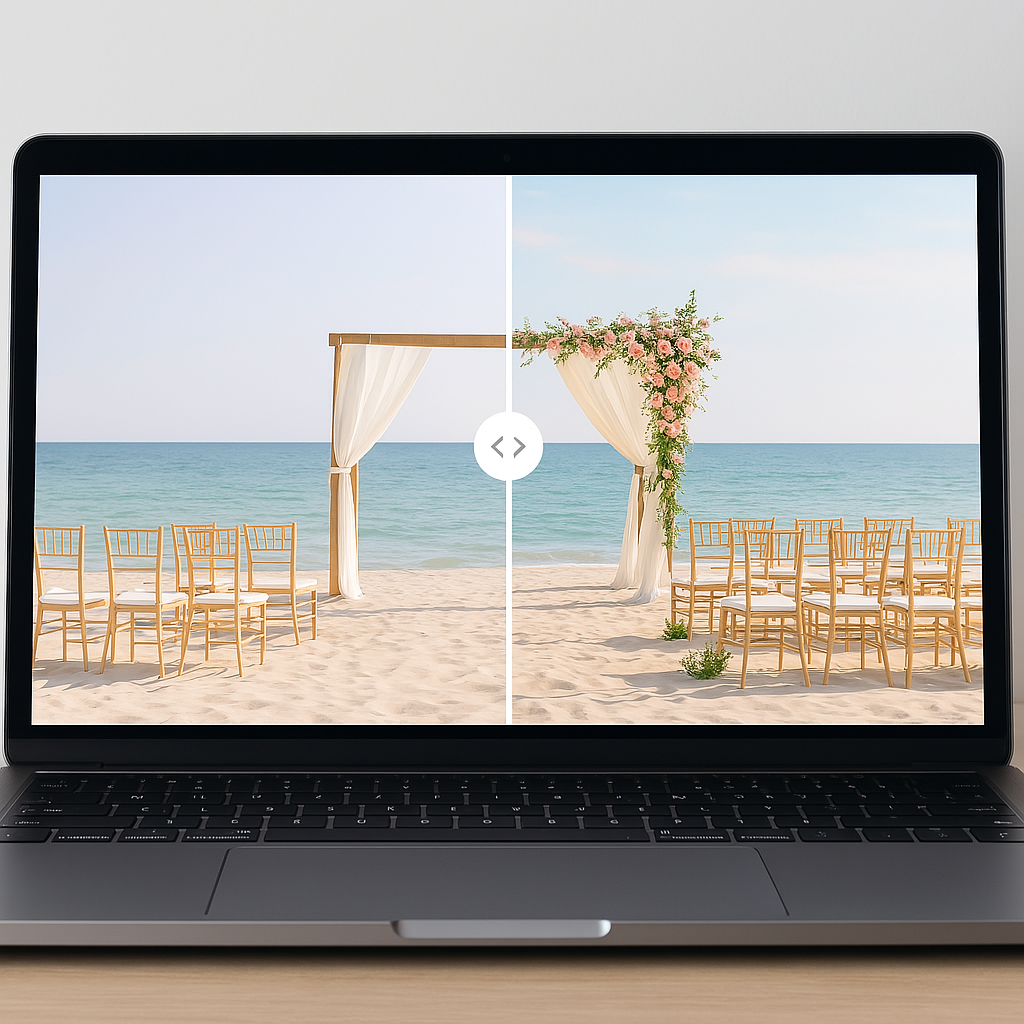
This is where the "Visual OS" comes into play. To bridge the gap between rows of data and the reality of your wedding day, you need tools like VenuePreview. We allow you to upload photos of your empty venue and use AI to generate realistic, fully decorated visualizations. By combining the rigid organization of the spreadsheets below with the visual foresight of our platform, you create a planning system that covers both the math and the magic. You can see how our platform works to eliminate the "visualization gap" that spreadsheets cannot solve.
Below is the curated, validated list of the high-utility Google Sheets workbooks that are actually powering weddings in 2026, along with the strategic framework for integrating them into your workflow.
1. Massive All‑in‑One Wedding Workbooks
The "All-in-One" workbook is the foundational layer of your planning stack. These are not simple checklists. They are comprehensive project management systems designed to house every data point relevant to your event. In 2026, the community-driven development of these tools on platforms like Reddit often outpaces commercial software in terms of utility and agility.
The 36‑Page Wedding Google Sheets Workbook
Originating from the r/weddingplanning community, this workbook has become a standard for couples who require granular control. It operates on the principle that if it is not documented, it does not exist. The workbook includes extensive tabs for priorities, a month-by-month checklist, and a detailed breakdown of rentals and packing lists.
What makes this specific workbook valuable is its exhaustive nature. It anticipates needs you have not yet considered, such as specific shot lists for photography or the logistical flow of the weekend schedule. It forces you to think through the "user journey" of your guests from arrival to departure.
To utilize this resource:
- Navigate to the Reddit source thread.
- Open the Google Sheets link provided in the post.
- Select File → Make a copy to save it to your personal Drive.
The 30‑Page "Ultimate Wedding Planning Spreadsheet"
Updated specifically for the influx of newly engaged couples in 2026, this workbook iterates on the standard model by adding lifestyle and post-event elements. It acknowledges that the wedding is not just an event but a transition. Consequently, it includes specific tabs for honeymoon brainstorming and an alcohol calculator, which are often overlooked in generic templates.
The inclusion of a "Day-of binder template" is particularly strategic. It allows you to export your digital plan into a format that can be handed to a day-of coordinator, ensuring that your digital planning translates into physical execution.
"How to Plan a Wedding in 19 Spreadsheet Tabs"
For couples who find 36 pages of data overwhelming, this 19-tab version offers a streamlined alternative. It embraces a "minimal viable product" philosophy. It strips away the edge cases and focuses on the core pillars: Budget, Guest List, Vendors, and To-Do lists.
A unique psychological feature of this sheet is the "F*ck-it bucket." This tab allows you to explicitly list the traditions or expenses you are intentionally skipping. This is a powerful prioritization mechanism. By writing down what you are not doing, you free up mental energy and budget for the things that matter.
Commercial-Style "All‑in‑One Wedding Planner"
This sheet bridges the gap between community templates and professional software. It features a polished UI with color-coded cells that distinguish between input fields and automated formula cells. This reduces the risk of breaking complex calculations—a common issue for users less familiar with spreadsheet logic.
2. Budget‑Focused Google Sheets
Financial variance is the primary source of stress in wedding planning. With the national average wedding cost holding steady at $36,000 in 2026, and major metropolitan areas like New York City averaging nearly $88,000, precision is required. General workbooks often lack the depth required for complex cash flow management.
The Blueprint Budget Worksheet
This worksheet is engineered specifically for allocation. It does not just track what you spent. It helps you model what you should spend based on industry standard percentages. Since venue and catering combined now account for roughly 50 percent of total budgets, having a tool that immediately flags when you over-index on a specific category is critical for solvency.
Tracker via All-in-One Planner
For those who need to manage cash flow rather than just total cost, the budget tab in the All-in-One planner uses formula cells to auto-calculate totals as you pay deposits. This is essential for managing liquidity. You may be under budget in total, but if all your deposits are due in the same month, you have a cash flow problem. This sheet helps visualize those payment spikes.
3. Guest List, RSVP & Seating Sheets
Guest data management is often the bottleneck of wedding planning. It is a high-volume, low-complexity task that is prone to human error. Automation is the solution here.
The Data-Entry Approach
The 36-page workbook mentioned earlier contains robust columns for tracking meal choices, dietary restrictions, and accommodation needs. However, manual entry is inefficient.
The Automated Workflow: Google Forms + Sheets
The superior strategy is to decentralize data entry. Instead of you typing 150 names and meal choices, you build a system where guests do it for you. By connecting a Google Form to your Google Sheet, you create a pipeline where RSVP data flows directly into your database. This eliminates transcription errors and saves hours of manual work.
4. Vendor & Venue Planning Sheets
Selecting a venue is the highest-stakes decision you will make. It consumes half your budget and dictates every other aesthetic choice.
Venue Comparison Matrices
The decision process for venues requires a side-by-side analysis of disparate data points: capacity, rental fees, catering restrictions, and load-in times. The comparison tabs found in the 30-Page Workbook allow you to normalize this data.
However, a spreadsheet row that says "Ballroom A: High Ceilings" does not help you understand the spatial volume or lighting challenges. This is where you must integrate VenuePreview into your comparison workflow. We recommend adding a column to your comparison matrix titled "Visualization Rating." Before you sign a contract, upload the venue's photo to our platform to test your decor ideas. If a venue looks great on a spreadsheet but fails the visualization test, you have saved yourself a $15,000 mistake.
Vendor Sourcing Trackers
Once the venue is secured, you manage the remaining vendor stack. The Blueprint and All-in-One worksheets provide tabs for tracking contract status and payment schedules. This functions as your CRM (Customer Relationship Management) for the wedding, ensuring no vendor is ghosted and no invoice is missed.
5. Timeline, Day‑Of & Logistics Sheets
Planning and execution are distinct phases. The tools you use to plan the wedding are not the tools you use to run the wedding.
The Run-of-Show Sheet
Found in the major workbooks, these sheets break the day down into 15-minute increments. This granularity is necessary to identify logistical conflicts. For example, if hair and makeup is scheduled to end at 2:00 PM but the photographer arrives at 1:30 PM for "getting ready" shots, you have a conflict. The spreadsheet reveals these clashes before they become reality.
Packing Lists & Decor Trackers
Logistics creates success. The "Packing List" tabs in the 30-Page Workbook ensure that the physical items—from the rings to the reception signage—actually arrive at the venue. This is the final checklist that prevents critical assets from being left behind.
6. How to Use These Sheets With VenuePreview
We have established that spreadsheets are the "Logistics OS" of your wedding. VenuePreview is the "Visual OS." The magic happens when you integrate them into a single feedback loop.
Most couples make the mistake of treating decor planning as a separate, abstract activity. They pin images on Pinterest and hope the florist can translate that vibe into the specific venue. This is a recipe for misalignment.
The Integrated Workflow:
- Shortlist: Use the Venue Comparison tab in your Google Sheet to narrow your options to 1–3 finalists based on budget and capacity.
- Visualize: Take a photo of the empty venue. Upload it to VenuePreview.
- Iterate: Generate decor variations. Test a "Moody/Dark" theme versus a "Bright/Floral" theme. See exactly how the lighting impacts the space.
- Validate: Add a specific column in your spreadsheet for "VenuePreview Link." Paste the URL of your favorite visualization.
- Distribute: When you send your spreadsheet to your planner or florist, they do not just see numbers. They click the link and see the exact target state.
This removes ambiguity. "Romantic lighting" means different things to different people. A photorealistic rendering generated by our AI leaves no room for interpretation.
7. Quick Start: Minimal Stack for 2026 Couples
If the analysis of 36-page workbooks feels daunting, you can execute a successful wedding with a leaner stack. Complexity is not a requirement for success.
The MVP (Minimum Viable Planner) Stack:
- The Brain: 30‑Page Workbook. Use this for the master timeline and budget.
- The Input Mechanism: Google Forms for RSVP. Automate the guest data collection.
- The Visualizer: VenuePreview. Validate your aesthetic decisions before spending money.
Building Your Modern Wedding Toolkit
The complexity of modern weddings—driven by rising costs and logistical density—cannot be managed by memory or scattered notes. You need a system. The Google Sheets listed above provide the structural integrity required to manage thousands of data points. They are the backbone of your planning process.
However, data without vision is blind. While your spreadsheet ensures you stay on budget, it cannot ensure you love the result. By coupling your logistical tools with VenuePreview's visualization capabilities, you move from guessing to knowing. You secure the ability to see your wedding before you pay for it.
The most successful couples in 2026 are not working harder; they are building better stacks. Download your workbook, automate your RSVPs, and create your first venue visualization today to start planning with absolute confidence.
Ready to Visualize Your Wedding Venue?
See exactly how your venue will look on your wedding day with AI-powered visualizations. Get started in minutes with packages starting at just $19.