The Ultimate List of Wedding Planning Tools Couples Actually Use in 2026
Planning a wedding in 2026 is less like organizing a party and more like managing a complex, high-stakes product launch. You have a strict budget, a defined timeline, multiple vendors (contractors), and a high emotional investment in the final deliverable. The complexity is real. Recent data indicates that couples spend an average of six hours per week just reviewing details and managing logistics.
To survive this process without burnout, you cannot rely on memory or scattered sticky notes. You need a system. Specifically, you need a "tech stack"—a collection of digital tools that handle the heavy lifting of organization, finance, and design. In fact, 90% of planning now happens online. The market is flooded with options, but most couples only need a core set of reliable applications to move from "overwhelmed" to "executed."
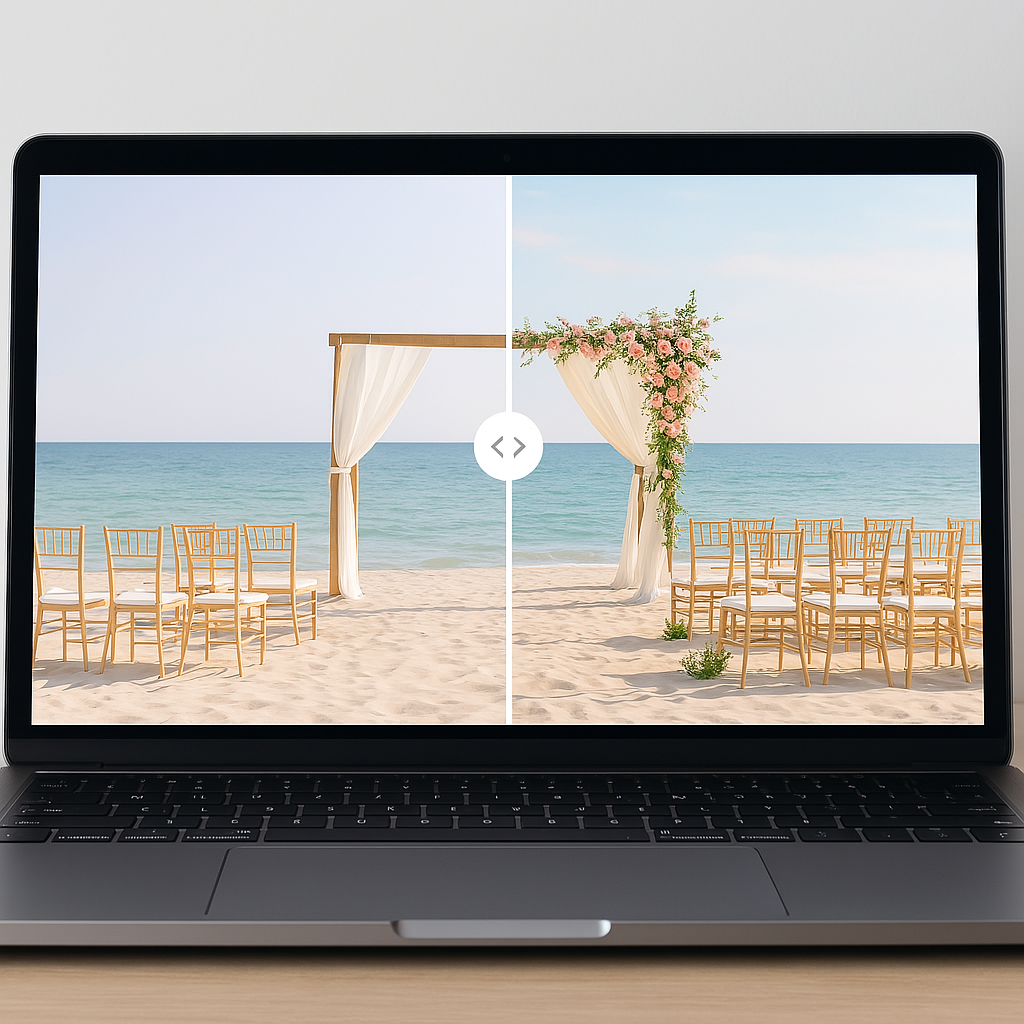
This article breaks down the essential categories of the modern wedding stack. We will cover the operating systems for big-picture organization, the financial tools to keep you solvent, and the emerging class of AI-powered visualization tools. This includes VenuePreview, a critical tool for the design phase that allows you to see how our platform works to transform empty venue photos into fully decorated visualizations. By the end of this post, you will know exactly which tools deserve a place in your planning toolkit.
Wedding Planning Tools for Big-Picture Organization
Think of this category as your wedding's Operating System (OS). This is the central hub where tasks live, deadlines are tracked, and vendor information is stored. You generally have two strategic choices here: the specialized "all-in-one" platform or the flexible "custom build."
All-in-One Wedding Platforms
For couples who want a structured, pre-defined path, all-in-one platforms are the standard solution. These platforms combine checklists, vendor directories, and website builders into a single ecosystem.
- The Knot: A dominant player that excels at guest-facing tools and comprehensive vendor directories. Their checklist adapts to your wedding date to keep you on a critical path.
- WeddingWire: Focuses heavily on vendor discovery. If your primary bottleneck is finding pros, their review system and lead generation tools are robust.
- Zola: Known for its seamless integration of registry and planning. Zola offers a modern user experience that unifies the website, registry, and checklist.
These platforms are excellent "home bases" because they reduce friction. You do not need to build the system; you just populate it.
General Project Management Tools
For couples who manage complex projects in their professional lives, standard wedding platforms can feel restrictive. If you prefer to customize your workflow, general project management tools are the superior choice.
- Trello: Uses a Kanban board style (To Do, Doing, Done). Trello has an official "Wedding Planning Playbook" that helps you visualize progress across different workstreams like catering or attire.
- Notion: The choice for the highly organized. Notion allows you to build a relational database of vendors, contracts, and mood boards. It is a "composable" tool where you can link your budget database directly to your vendor list.
- Google Workspace: Specifically Google Sheets. Many expert planners recommend a master spreadsheet as the ultimate "source of truth" because it is flexible and easily shared with partners and parents.
Budget & Expense Tracking Tools
The budget is the most common point of failure in wedding planning. Data shows that the average wedding cost in the U.S. is projected to reach approximately $36,000 in 2025. More alarmingly, 74% of couples go over their initial budget. To avoid this, you need a dedicated financial tool.
The Essentials:
- Built-in Trackers: The Knot and Zola have integrated budget tools that allow you to allocate funds by category (e.g., 17% for venue, 15% for catering). These are good for high-level visibility.
- YNAB (You Need A Budget): For couples who share finances, YNAB uses a zero-based budgeting method. It forces you to assign every dollar a job. This is highly effective for ensuring your wedding spending does not cannibalize your savings.
- Spreadsheets: A rigorous Google Sheet remains the gold standard for tracking "Planned" vs. "Actual" spending and payment due dates.
Strategic Tip: Do not just track what you spend. Track when payments are due. Vendor contracts often require 50% upfront and 50% near the event date. Missing a payment deadline can void a contract.
Guest List, RSVPs & Seating Chart Tools
Managing guests is essentially Customer Relationship Management (CRM). You need to track contact info, dietary restrictions, plus-ones, and table assignments.
- Integrated Tools: Most all-in-one platforms handle this well. The critical feature to look for is "household logic"—the ability to group a couple or family so that one RSVP covers the group.
- RSVPify: If your event has complex events (e.g., a Welcome Dinner and a Brunch), RSVPify offers deeper customization for secondary events that generic platforms often lack.
- Seating Puzzles: Drag-and-drop seating charts are non-negotiable. Tools like Seat Puzzle or the features within Aisle Planner allow you to visualize the room layout. This prevents the logistical nightmare of assigning 12 people to a 10-person table.
Venue & Vendor Discovery Tools
Finding the right team is a funnel problem. You start with a wide pool of options and filter down to the few who match your style and budget.
- Directories: WeddingWire and The Knot remain the largest databases. They allow you to filter by location, price, and venue type.
- Social Search: Instagram and TikTok are powerful for discovery, but they lack structured data. Use them to find the aesthetic, then cross-reference with Google or a directory to verify availability and reviews.
- Your Wedding Atlas: An emerging tool that uses a map-based interface. This is particularly useful if you are planning a wedding in a specific geographic cluster and want to minimize travel time for guests.
Note that 82% of couples hire the venue first. Once the venue is locked, it dictates the date and the capacity for all other vendors.
Venue Visualization & Decor Planning Tools (Featuring VenuePreview)
This is the "Visualization Gap." Most tools help you organize lists and numbers. Very few help you validate product decisions before you buy.
Couples often struggle to bridge the gap between a Pinterest board and an empty venue. You might love a specific floral arrangement online, but will it clash with the carpet in your ballroom? 48% of couples struggle to balance their budget with the picture-perfect expectations set by social media. This is where VenuePreview fits into your stack.
What VenuePreview Does
VenuePreview is a specialized visualization engine. It allows you to upload 1-3 photos of your actual venue and use AI to generate fully decorated visualizations in minutes.
Instead of guessing, you can see 40 to 200 variations of your space styled with different color palettes, lighting, and floral arrangements. This moves you from "imagining" to "validating."
Why You Need This Layer
- Risk Reduction: Decor is expensive. Flowers and rentals can easily consume 20-30% of your budget. Visualizing the outcome prevents costly mistakes, like ordering tall centerpieces that look sparse in a high-ceilinged room.
- Vendor Alignment: Words are imprecise. Showing your florist a generated image of your venue with the exact look you want is infinitely more effective than describing a "romantic vibe."
- Speed: Traditional rendering services take weeks and cost hundreds of dollars. VenuePreview delivers results in 10-25 minutes.
Pricing and Access
The tool uses a one-time purchase model, avoiding subscription fatigue. Packages range from a $19 Basic plan (40 visualizations) to a $49 Luxury plan (200 visualizations). You can check our pricing details to see which tier fits your needs.
If you are currently in the venue selection or decor planning phase, you can start visualizing your venue immediately.
Inspiration & Mood-Board Tools
Before you execute, you need to diverge and explore ideas. This is the R&D phase of your wedding.
- Pinterest: The classic choice. 75% of couples use it. Create separate boards for "Ceremony," "Reception," and "Attire" to keep ideas distinct.
- Instagram: Use the "Save to Collection" feature.
- A Word of Warning: Be wary of the "Instagram Effect." Editorial shoots often use budgets that are not realistic for a standard wedding. Use these tools for directional inspiration, then use a tool like VenuePreview to ground those ideas in reality.
Timeline, Checklist & Task Management Tools
A wedding is a project with a hard deadline. If you miss a task, you cannot push the launch date.
- Timeline Genius: A specialized tool that creates customized run-of-show schedules. It is excellent for the day-of timeline, ensuring vendors know exactly when to load in.
- Google Calendar: Create a shared calendar specifically for the wedding. Put every payment due date, fitting, and vendor meeting on it.
- WeddingHappy: If you are not using an all-in-one platform, this app is a great standalone checklist that adjusts tasks based on your wedding date.
Data shows that 52% of couples begin planning 12 months out. You need a tool that paces you so you don't burn out in month three or panic in month eleven.
Communication & Collaboration Tools
Wedding planning requires constant communication with your partner, family, and vendors. Centralizing this communication is key to maintaining your sanity.
- Dedicated Email: Create a shared email address (e.g., smithwedding2026@gmail.com). This keeps vendor contracts out of your work inbox and allows both partners to see correspondence.
- Google Drive / Dropbox: You need a cloud storage solution for contracts and invoices. Do not leave these as attachments in email threads. Save them to a structured folder system immediately.
- WhatsApp / Slack: For the wedding party. A dedicated channel keeps the chatter contained and allows you to broadcast updates quickly.
How to Build Your Own Wedding Planning Tech Stack
You do not need every tool listed above. That leads to fragmentation. You need to build a "Minimum Viable Stack" that covers your bases without adding administrative overhead.
For most modern couples, a robust stack looks like this:
- The OS: One central platform (e.g., The Knot or Notion) for the master checklist.
- The Bank: A dedicated budget spreadsheet or YNAB account.
- The Visualizer: VenuePreview to validate decor choices in your specific venue.
- The File Cabinet: Google Drive for contracts.
- The Communication Channel: A shared email address.
This setup covers organization, finance, product (decor), legal (contracts), and communication. It is efficient, low-cost, and scalable.
The Path to a Stress-Free Wedding Plan
The difference between a stressful wedding and an organized one is rarely about budget; it is about the system you use to manage the complexity. Digital tools cannot make the decisions for you, but they can give you the data and visibility you need to make those decisions with confidence.
Start with your OS to get organized. Get your financial house in order with a tracker. And when it comes to the high-stakes decisions about how your wedding will look, do not rely on imagination alone.
Use VenuePreview to bridge the gap between your vision and reality. By validating your design choices early, you save money and eliminate the anxiety of the unknown. You can create your account here and start seeing your future wedding today.
Ready to Visualize Your Wedding Venue?
See exactly how your venue will look on your wedding day with AI-powered visualizations. Get started in minutes with packages starting at just $19.